
Device screen translation QA
Spot the difference.Keep the evidence.
Compare device screenshots with your translation reference.Review visible text, confirm findings and export a clear report.
CSV / XLSX references · Original image evidence · Human review
Free to start · 20 AI analyses
- 1
Bring your files
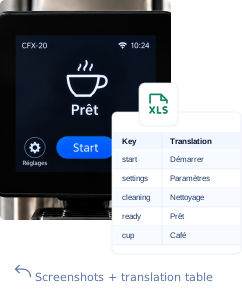
Upload screen images and a translation table (CSV or XLSX).
- 2
Review in context
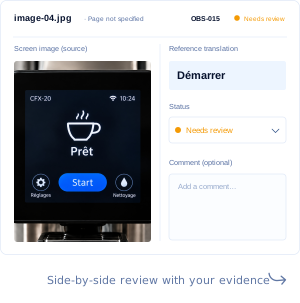
Compare each string with the original screen, side by side.
- 3
Share the result
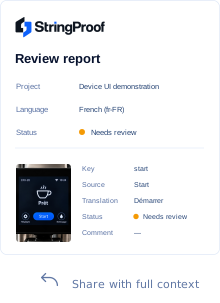
Export a clear report with review decisions and image references.
In context
One reference.Every finding in context.
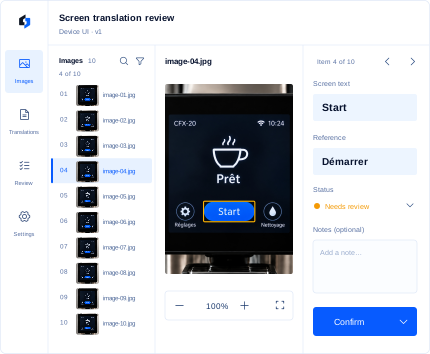
See the original image, the screen text and your reference translation side by side. Make confident decisions with full context.

Original image evidence
Always see the exact screenshot alongside every finding.

Frozen reference versions
Compare against your translation table, so everyone reviews the same source.
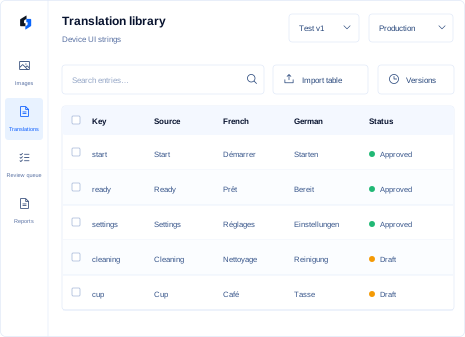
Translation library
Manage and publish translation versions
Import your tables, review multilingual entries and publish controlled releases from one reference library.
Import CSV and XLSX
Bring your existing translation tables into StringProof.

Review multilingual entries
Review changed strings before freezing a Test release.

Manage Test and Production versions
Promote reviewed releases, download XLSX files and roll back Production when needed.
Bring clarity to your next screen review.
Open workspace